If I Delete a WhatsApp Group, Does It Delete for Everyone?
You tapped delete on a WhatsApp group, or you're about to, and you want to know if it vanishes for everyone. No. Deleting a group only removes it from your own chats. Everyone else still has the group and its history.
There's one exception, and it takes work. A group admin can delete the group for all members, but WhatsApp's page says they must first remove every other member. Even then, the people who were removed keep their copy of the chat unless they delete it themselves.
What "delete" actually does
WhatsApp's help page for members says that when you delete a group, you no longer see it in your chats and the group chat history is erased from your phone. That's the whole effect. It works on your device and nothing else.
| Who | What deleting changes |
|---|---|
| You | The group leaves your Chats tab and its history is erased from your phone |
| Other members | Nothing. They still see the group and all previous content |
| Admins | Told that you left (see below), not that you deleted |
WhatsApp's pages only describe deleting a group as part of leaving it: you choose Exit and delete for me, or you exit first and delete the chat afterwards.
Will they know?
Leaving is what people can see, not deleting. WhatsApp says that when you exit a group, group admins see a line in the group showing the contact name or phone number followed by "left." It adds that it's not possible to disable this notification, and that only group admins are told.
Regular members get no alert. WhatsApp does say your profile name and phone number go into the Past members list in Group info, and your profile photo may show depending on your settings. Members can see that list for up to 60 days after you leave. We cover all of that in what happens when you leave a WhatsApp group, so this page doesn't repeat it.
Exit group or Exit and delete for me
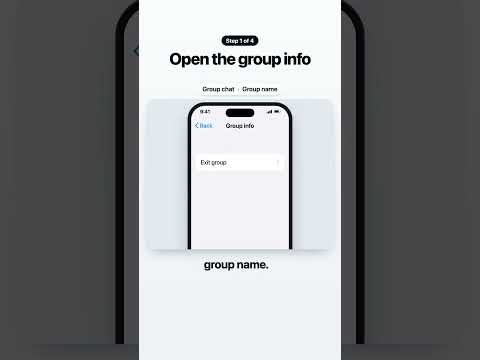
Both options sit on the same screen. After you tap the group name and choose Exit group, WhatsApp shows two choices:
- Exit group. You leave but keep your chat history.
- Exit and delete for me. You leave and the group is removed from your Chats tab. WhatsApp says this permanently removes your chat history.
The page adds one piece of advice. If you've experienced a scam or fraud, choose Exit group instead, so your messages are still there as evidence for reporting to local authorities.
You can also delete a group you exited earlier. Open the group chat, tap the group name, then tap Delete group > Delete group. Watch the photos and videos: on Android the exit screen lets you choose to delete media received in the chat from your gallery, and both the Android and iPhone pages note that deleting a group also deletes media received in it from your device.
How an admin deletes a group for everyone
Only admins can delete a group for all members. WhatsApp's admin page says you must remove all members first. Here's the path it gives:
- Open the group chat and tap the group name.
- Tap a member's name, then tap Remove > OK (the button shows the member's name). Repeat until you're the only one left.
- Tap the group name again and tap Exit group, then choose Exit and delete for me.
If you exit without removing everyone first, the page says you can only delete the group from your own device, and it isn't deleted for the other members.
Removing someone one by one is slow in a large group. If you only need a person out, see how to remove someone from a WhatsApp group.
What the other members still see
After an admin removes everyone and deletes the group, WhatsApp says the group isn't deleted on other members' devices. They still see it in their chats, and they still see all previous content unless they delete it themselves. The Android page adds that no one will be able to send messages in it.
WhatsApp describes no way to wipe a group's messages from other people's phones. An admin who deletes a group stops new messages, but each member's copy of the history stays until they delete it.
The removed members' names and numbers appear in the Past members list, for up to 60 days.
Special cases
- The only admin leaves. If you're the only admin and you leave the group, WhatsApp says another member is chosen at random to become the new admin. If you rejoin and want admin status back, you have to ask an admin to make you one.
- The group is part of a community. WhatsApp says that when you exit a group that's part of a community, you also exit the community. Leaving a community also takes you out of its groups. The page for exiting a community has the details.
- Reporting on the way out. You may see Report group on the exit screen. If you pick it, WhatsApp receives up to the last five messages, and WhatsApp says no one in the group is notified.
Can you get a deleted group back?
No. The help pages say you can't restore a group once it's been deleted, and you'll need to create a new group.
What about a backup? The pages we read don't say anything about restoring a deleted group from a chat backup, so we can't promise that route works. If you exited but didn't delete, you still have the chat, and the way back in is an invitation: WhatsApp says you need to ask a group admin to re-invite you.
If you want to lock the door against being re-added, the member page mentions your group privacy settings, which control who can add you to a group.
Where Tenashi fits
A customer group run from one phone depends on whoever holds that phone. Replies wait for that person, and so does every removal, admin change or invite link.
When your WhatsApp number is connected to Tenashi, the groups it is in show up in the shared inbox next to your direct chats, and the team can read and reply from their own logins. Admin work can happen there too: create groups, add or remove members, promote or demote admins, change the name and description, and share invite links. That covers the groups your connected number is in, from the day you connect it. For the wider setup, read our guide to WhatsApp groups for business.
Plans start at $18/mo. Get started.
FAQ
If I delete a WhatsApp group, does it delete it for everyone?
No. Deleting a group erases it only from your own phone. Other members still see the group and its history. Only an admin can delete a group for all members, and only after removing every other member first.
If I delete a WhatsApp group, will they know?
WhatsApp doesn't say deleting is announced. Leaving is. Group admins see a line saying you left, and WhatsApp says that notice can't be turned off. Other members aren't notified, though your name stays in Past members for up to 60 days.
If I delete a WhatsApp group as admin, does it delete it for everyone?
Only if you remove all members first and then exit and delete. Even then, WhatsApp says the group stays on the other members' devices with its previous content unless they delete it, but no one can send messages in it.
If I delete a WhatsApp group, can I get it back?
No. WhatsApp says a deleted group can't be restored and you need to create a new group. Its pages don't describe restoring one from a backup. If you only exited, ask an admin to re-invite you.
What's the difference between Exit group and Exit and delete for me?
Exit group removes you from the group but keeps your chat history. Exit and delete for me also removes the group from your Chats tab and permanently erases the history from your phone. Neither one deletes the group for other members.
Deleting a group is a private clean-up of your own phone, and ending it for everyone takes an admin and a lot of removals. If your team needs to see group chats on a shared number, get started with Tenashi.