If I Reinstall WhatsApp, Will I Lose My Chats?
You're about to delete WhatsApp and put it back, maybe to clear a glitch, and you want to know: if I reinstall WhatsApp, will I lose my chats? Your chats come back only if you have a backup and restore it when the app offers it during setup. Without one, the old chats on that phone are gone.
WhatsApp can't step in afterwards. Its help center says it can't restore, transfer or delete your chats for you. So what you keep is decided before you uninstall, by whether a recent backup exists.
What happens when you reinstall
The app comes off the phone, and the chats on it go with it. What survives is whatever sits in your backup, and you pull it back in during setup.
| Situation | What happens |
|---|---|
| You have a backup and tap Restore | Messages come back first, then photos, videos and other media in the background |
| You have no backup | Nothing to restore from, so the chats that were on the phone don't come back |
| Messages sent or received after your last backup | WhatsApp says they can't be restored |
| You tap Skip on the restore prompt | The next backup replaces the old one with only the chats you've received since |
| Your latest backup is more than 120 days old | Restoring may not be possible, even if your account is still active |
| You reinstall in less than 30 days | WhatsApp says you should be able to keep all of your groups |
Reinstalling isn't deleting your account. Deleting is a separate step under Settings > Account > Delete my account, and WhatsApp's page for it says that action deletes you from all your groups and deletes your backup. Groups are tied to your account, not the app: WhatsApp says you'll be removed from them if you've been inactive for more than 30 days.
On the WhatsApp Business app, the reinstall page adds one more cost: you may need to re-enter your business profile details, including your website, address and business hours.
Check your backup before you uninstall
Open WhatsApp and look for the time and size of your last backup. If you can see them, a backup exists.
- Open Settings in WhatsApp (on iPhone, tap Settings or your profile picture).
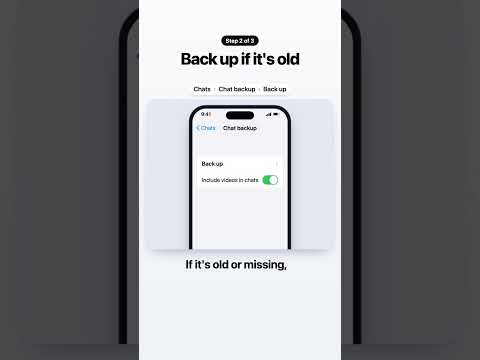
- Tap Chats > Chat backup.
- Read the time and size of the last backup.
If it's old or missing, back up now: tap Back up on that screen on Android, or Back up now on iPhone. WhatsApp says you can back up to its own cloud storage or to your Google Account, though it calls WhatsApp cloud storage a feature it's still testing, so it may not be on your phone yet. Check Include videos in chats before you tap: WhatsApp says videos are restored only if that was on for your latest backup. Android also has a Back up over mobile data switch.
On iPhone the choice is iCloud or WhatsApp cloud storage, with the same testing note. For an iCloud backup, WhatsApp asks you to check one thing before you restore: open iPhone Settings, tap your name, then iCloud > iCloud Drive, turn on Sync this iPhone, and make sure WhatsApp is on under Apps Syncing to iCloud Drive.
The phone number you back up with and the one you restore with must be the same. And WhatsApp stores one backup per account, so each new backup replaces the old one. That's why the restore page warns: if chats are already missing from the phone, don't create a new backup, because it permanently replaces the one that still holds them.
Restore your chats after the reinstall
On Android:
- Uninstall and reinstall WhatsApp.
- Set it up with the same phone number you backed up with.
- Tap Restore when prompted. Don't tap Skip if you still want your old chats.
On iPhone, uninstall and reinstall, verify your phone number and Apple ID, then tap Restore Chat History. If you tap Skip media restore on iPhone, WhatsApp says you can't restore that media later.
For extra security you may be asked to prove it's you with a code by text or call, unless you've turned on two-step verification or end-to-end encrypted backups. Restoring takes time. Keep WhatsApp open until your chats appear, stay on Wi-Fi and keep the phone plugged in. WhatsApp backs up your chats again only after the restore is complete.
An Android backup can't be restored on an iPhone, and the reverse is also true. Moving between the two uses chat transfer, not a backup, and if that stalls, see WhatsApp chat transfer stuck.
The phone also needs room. On Android, WhatsApp says the space on the phone must be larger than the backup you're restoring. On iPhone, restoring media needs temporary free space, and WhatsApp shows how much to free up. If a restore fails for lack of storage, its advice is to delete the app, free up space and restore again. WhatsApp storage full covers freeing space.
Will messages reach you while the app is gone?
Messages sent while the app is uninstalled can't reach that phone, but they aren't lost straight away: WhatsApp's privacy policy says an undelivered message is kept in encrypted form on its servers for up to 30 days while it tries to deliver it, then deleted. What senders see in the meantime is covered in what happens to messages if you uninstall WhatsApp. If the restore itself fails or stalls, see WhatsApp backup not restoring, and for an encrypted backup you can't unlock, forgot WhatsApp backup password.
What happens to linked devices
WhatsApp's help pages don't say directly what a reinstall does to linked devices. The closest statement is on its page about recovering a compromised account: when you re-register your account with the 6-digit code, all devices logged into it are automatically logged out. So after a reinstall, open the phone's Linked devices screen and link again anything that's missing, such as WhatsApp Web.
Linked devices can't back up or restore for you either. WhatsApp says you need the phone for that.
Where Tenashi fits
A reinstall is a small event for one person and a scare for a team that answers customers on a shared number. If that number is connected to Tenashi, the messages it has already sent and received are stored on Tenashi's servers as they arrive, so the thread your team works from doesn't depend on what the phone still holds. That covers chats on your own connected business number, from the day you connect it, and nothing from before.
Tenashi is a linked device, so if the reinstall logs it out, its banner shows the connection state (for example Logged out) and you link it again from the phone's Linked devices screen. For more on keeping a number in good standing, read our WhatsApp ban guide. Plans start at $18/mo.
FAQ
If I reinstall WhatsApp, will I lose my messages?
Only if you have no backup to restore. With a backup, tap Restore (Android) or Restore Chat History (iPhone) after you verify your number. Messages sent or received after the latest backup can't be restored, so back up just before you uninstall.
If I reinstall WhatsApp, what happens?
The app and its local chats are removed, then you verify your number and WhatsApp offers to restore from your backup. Messages return first, then media in the background. Your account itself stays, because deleting it is a separate step under Settings > Account.
If I reinstall WhatsApp, will it delete everything?
No. Reinstalling doesn't delete your account, and WhatsApp says that if you reinstall in less than 30 days you should keep your groups. It does remove the chats stored on the phone, and only a backup brings them back. Check Settings > Chats > Chat backup for your last backup first.
If I reinstall WhatsApp, will I get messages?
New messages arrive once you've reinstalled and verified your number again. A message that can't be delivered waits on WhatsApp's servers, encrypted, for up to 30 days as it tries to deliver it, then is deleted. Old chats come back only from your own backup.
How do I check that my WhatsApp backup exists?
Go to Settings > Chats > Chat backup. If your chats are backed up, you'll see the time and size of your last backup. If the backup is more than 120 days old, WhatsApp says restoring may not be possible.
A reinstall keeps your chats only through a backup you restore yourself, so check it first. To keep the shared thread safe on a team number, get started with Tenashi.